6 AI Skills That Are Most in Demand Among UK Employers in 2026
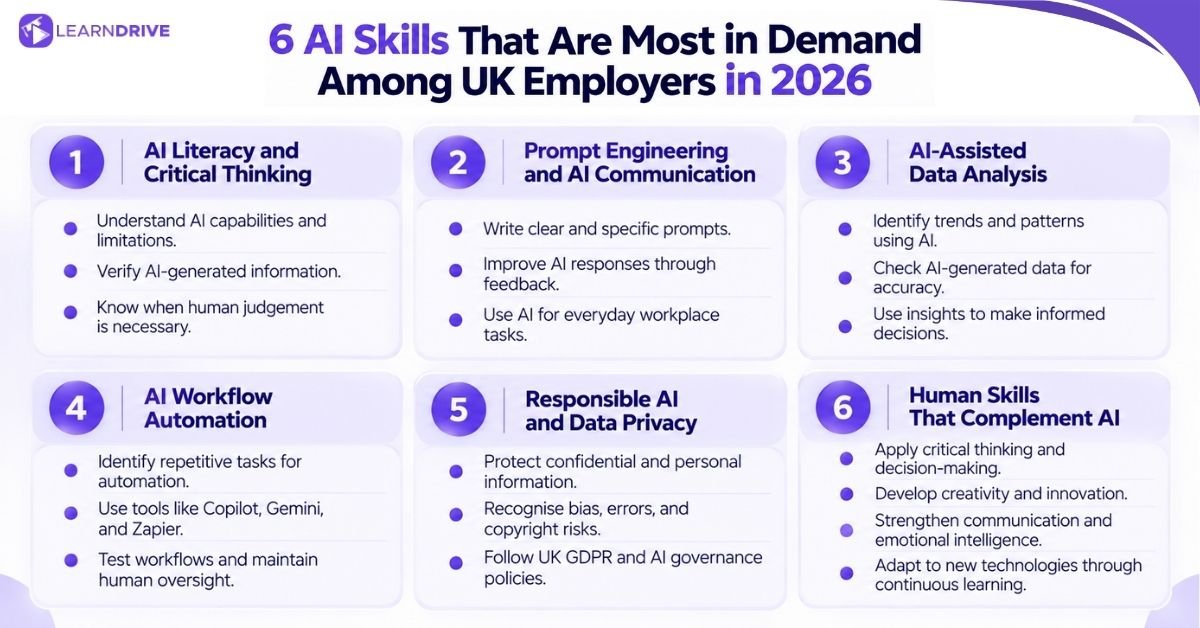
Six core areas come up repeatedly across UK job adverts and employer research. They run from critical thinking through to the human strengths that AI cannot replace, with each one building naturally on the last.
Think of these less as a checklist to complete and more as a set of habits that reinforce each other. Strong prompting makes verification faster, and verification makes automation safer to rely on.
1. AI Literacy
AI literacy is the base skill that every other workplace habit builds on. In the Institute of Student Employers (ISE) Survey 2026, 87% of UK employers said AI will reshape entry-level jobs. They named AI literacy as a top skill as software takes over routine admin and writing.
Understanding AI Capabilities and Limitations: Tools like ChatGPT can draft text and sum up long reports in seconds. Still, they only guess the next likely word instead of knowing the truth. Good AI literacy means spotting where a tool invents false quotes, dates, or UK laws.
Verifying AI-Generated Information: A KPMG UK study found that 58% of UK workers use AI output without checking if it is right. Because of this, 54% admit they have made mistakes at work using AI.
Treat every AI reply as a rough first draft. Use source-checking tools like Perplexity to view web citations, and always check names, dates, and numbers against primary records.
Knowing When Not to Use AI: AI literacy also means knowing when to leave software out of a task. Following Acas workplace guidance, big people choices must stay with humans from start to finish. This includes staff warnings, complaints, job cuts, and final hiring choices.
2. Prompt Engineering and Effective AI Communication
Clear instructions produce clearer results. In PwC UK’s Workforce Hopes and Fears Survey 2026, 56% of UK workers reported using AI at work, yet only 19% use generative AI every working day. Daily practice with clear prompts separates confident users from occasional ones.
Writing Clear and Effective Prompts: State the task, the audience, and the format you want in one request. Vague prompts produce vague answers, while specific instructions in assistants like Claude save several rounds of editing.
Improving Outputs Through Feedback and Iteration: Treat the first reply as a starting point, not a final answer. Ask the tool to adjust the tone, shorten a section, or add missing detail.
Applying Prompting Skills to Workplace Tasks: Strong prompting speeds up emails, meeting notes, and project briefs inside workspace tools like Notion AI and Grammarly. That habit transfers across almost every writing platform you use at work.
3. AI-Assisted Data Analysis and Problem-Solving
AI can process spreadsheets and reports far faster than manual review. According to GOV.UK’s AI Labour Market Survey 2025, the share of AI-active UK businesses employing data specialists rose from 48% to 66%, while everyday staff are increasingly expected to read data insights too.
Identifying Patterns and Insights in Data: Ask analytics platforms like Power BI or Tableau to sum up trends across sales figures, survey replies, or customer feedback. This spots patterns that manual scanning often misses.
Checking AI-Generated Analysis: Numbers can look right while still being wrong. When using spreadsheet tools like Excel Analyze Data, spot-check a sample of the results against your raw figures before sharing them.
Using AI Insights to Support Decisions: AI charts should guide a choice, not replace the thinking behind it. Present the data alongside your own view of what the numbers mean for the team.
4. AI Workflow Automation and Productivity
Automation saves the most time on repetitive, predictable tasks. GOV.UK’s survey of AI-active UK firms found that 57% plan to adopt agentic AI workflows within the next three years, while PwC UK found that 7% of UK workers already use agentic AI daily.
Identifying Repetitive Tasks to Automate: Look for tasks you repeat every week with little change, such as formatting weekly reports or sorting customer emails. These are the easiest jobs to automate first.
Using AI With Everyday Workplace Tools: No-code connectors like Zapier, Make, and Microsoft Power Automate link your inbox, calendar, and task boards together. Learning to connect these everyday apps matters far more than learning to code from scratch.
Testing Automated Workflows and Maintaining Human Oversight: Test any new workflow on a small batch of tasks before relying on it fully. Keep a human check in place for anything that goes to clients or affects budgets.
5. Responsible AI, Data Privacy and Governance
Safe use matters just as much as fast output. GOV.UK’s AI Labour Market Survey notes that 30% of AI-active UK firms face non-technical skills gaps, while 60% report gaps in understanding how AI systems and rules work.
Protecting Confidential and Personal Information: Never paste client names, bank details, or staff records into a public chatbot. The Information Commissioner’s Office (ICO) treats AI prompts the same as any other data handling under UK GDPR. Use enterprise compliance tools like Microsoft Purview or OneTrust to keep company records inside approved boundaries. Our AI in the workplace guide explores how UK teams balance these risks in more detail.
Recognising Bias, Accuracy and Copyright Risks: AI models can repeat unfair bias from their training data without warning. They can also copy protected text too closely. Always follow Intellectual Property Office (IPO) guidance on AI and copyright by checking that work is original before publishing it.
Applying Human Oversight and Accountability: Whoever submits AI-assisted work stays responsible for its accuracy. You cannot blame a software tool if a client report contains an error.
6. Human Skills That Complement AI
As AI handles more routine work, human skills matter even more. PwC UK’s 2026 AI Jobs Barometer shows that UK jobs using AI to support human judgement have grown by 39% since 2018, more than double the 17% growth in automated roles.
Critical Thinking and Decision-Making: Judge whether an AI suggestion actually fits your budget, team, and legal rules. Assistants like Claude or Microsoft Copilot can list project options in seconds, but a person must still make the final call.
Creativity and Innovation: Use AI to speed up brainstorming, not to replace original ideas. Design tools like Canva and Miro can generate twenty campaign layouts in a minute. As GOV.UK’s AI Skills Projections note, only a human can pick the angle that truly connects with UK customers.
Communication and Emotional Intelligence: Keep sensitive talks, client negotiations, and team reviews entirely human. While tools like Otter.ai or Slack AI can write up meeting notes, they cannot read a room or build trust during a tough conversation.
Adaptability and Continuous Learning: Treat AI workflows as a moving target rather than a one-off skill. Workspace tools like Google Gemini add new features every few months, so employers value staff who test updates and adapt fast.
How to Demonstrate AI Skills on a UK CV and in Job Interviews
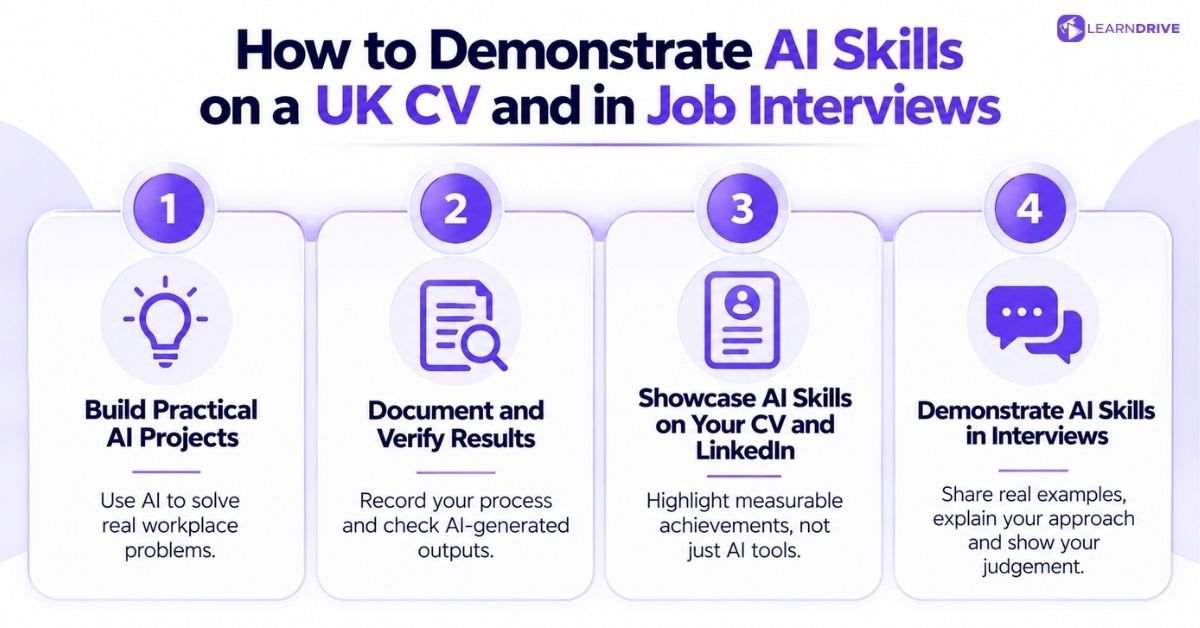
Demonstrating AI skills to UK employers requires more than listing tools or qualifications. Employers need to see how you apply AI to real tasks, check the accuracy of its outputs and achieve useful results.
Building practical examples, documenting your process and communicating your contribution clearly can help you demonstrate these skills on your CV, LinkedIn profile and in job interviews.
Building Practical Projects That Solve Real Problems
Pick a genuine task from your current or recent job, then use AI to improve how you handled it. A real example always beats a generic claim.
Documenting Your Process and Verifying Results
Keep a short note of what you asked, what the tool produced, and how you checked it. This record becomes useful evidence later, in applications or appraisals.
Showcasing AI Skills on Your CV and LinkedIn Profile
Describe the result, not the tool name alone. Listing a tool on a CV or finishing an online course does not guarantee an interview, promotion, or pay rise. Hiring managers value real proof.
Saying you “used AI analysis to cut report prep time by half” beats saying “familiar with AI”. Adding clear examples of tool use into your job search strategies proves your value to employers early on.
Explaining Your AI Skills in Job Interviews
Be ready to describe one specific example in detail, including how you verified the result. Interviewers increasingly test for judgement, not just tool familiarity.
How to Develop the AI Skills Employers Need?
Developing AI skills does not have to mean completing an expensive course or learning advanced programming.
The best approach is to identify the skills your role requires, practise them through everyday workplace tasks, and choose relevant courses or certifications to fill any gaps.
A structured plan can help you build confidence, demonstrate practical experience and prepare for future career opportunities.
Identifying Your Current Skills Gaps
Compare the overview table above against your current role and the one you want next. Note which areas feel genuinely unfamiliar rather than just untested.
Practising With Realistic Workplace Tasks
Use real, low-risk tasks from your own job to practise prompting and checking output. Practice sticks far better when it solves an actual problem.
Choosing Relevant AI Courses and Certifications
A course certificate, a regulated qualification, and a vendor exam are very different credentials. An online course certificate shows self-study and practical tool knowledge.
By contrast, regulated qualifications and vendor exams follow strict testing rules. If you need formal recognition, check live UK job adverts for your target role before paying for a course.
Some certificates carry weight with employers, while others mainly build your confidence and daily workflow fluency. Our in-demand AI certifications guide explains which options stand out on a UK CV. You can also read our certifications for career growth guide to compare options for your next career step.
Following a Four-Week AI Skills Development Plan
Spend week one on prompting basics and week two on data checking. Then spend week three on one automation task, and week four on recording a project for your CV.
Why “Human Skills” Are Top of UK Employers’ AI Wishlists?
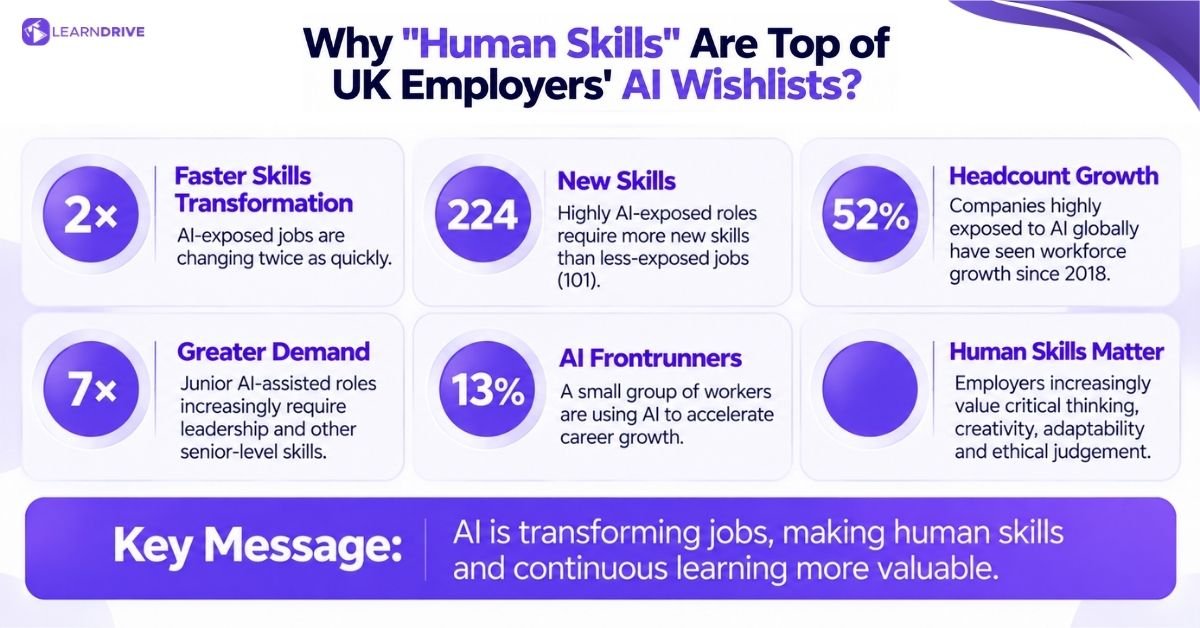
Broad workforce data in PwC’s AI Jobs Barometer analysis shows that high AI exposure speeds up change. Occupations with the greatest AI exposure experienced roughly double the skills transformation of the least-exposed jobs.
They required on average 224 new skills compared to 101 in the least-exposed group. Among the companies most exposed to AI globally, headcount growth reached 52% relative to a 2018 baseline.
These firms are not cutting staff; instead, they prize human strengths like judgement, creativity, and adaptability. In addition, analysis of 2.4 million US entry-level roles showed a major shift for beginners.
Junior AI-assisted roles are now seven times more likely to require senior qualities like leadership.
Similarly, PwC UK’s Workforce Hopes and Fears research found an emerging two-speed workforce. Around 62% of staff remain in core delivery roles and feel less supported to adapt. By contrast, a confident 13% minority of AI frontrunners use smart tools to speed up their career growth.
Employers are not asking staff to compete with AI on speed. They are asking staff to supply the ethical reasoning, empathy, and critical judgement that software cannot provide.
Which AI Skills Are Useful for Non-Technical Professionals?
Can You Learn AI Skills Without Coding?
How Can You Demonstrate AI Skills on Your CV?
Are AI Courses and Certifications Worth It?
How Can Employees Use AI Safely at Work?