Claude vs Gemini: What Is the Difference?
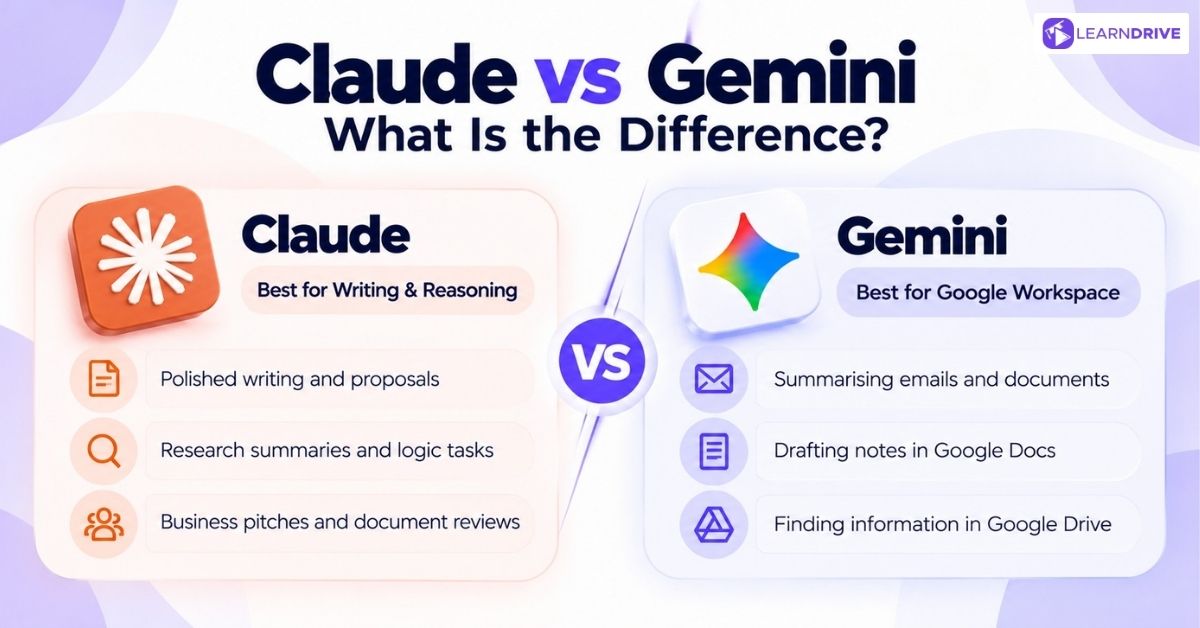
Claude focuses on deep thinking, strong writing, and careful checks of long files. Gemini focuses on wide reach across Google tools, live web facts, and fast image creation. Readers wanting an even wider view often check Claude versus ChatGPT versus Gemini to see how all three industry leaders perform together.
Claude at a Glance
Claude’s biggest strength is creating smooth, well-structured writing that needs very little editing before you share it with others. Writers, analysts, and project leads rely on it to draft client notes, research summaries, and detailed project proposals.
Common uses include writing business pitches, checking basic contracts, and solving multi-step logic problems. When selecting between Anthropic tiers, teams often compare Claude Sonnet and Claude Opus to match model power with budget requirements.
Gemini at a Glance
Gemini’s main strength is convenience inside your existing Google workspace without needing to jump between tabs. Team assistants and office managers gain real speed by using an AI that already sits inside their daily tools.
Common uses include summarizing long email threads, drafting notes inside Google Docs, and pulling facts straight from files in Google Drive.
Claude vs Gemini for Writing and Content Creation
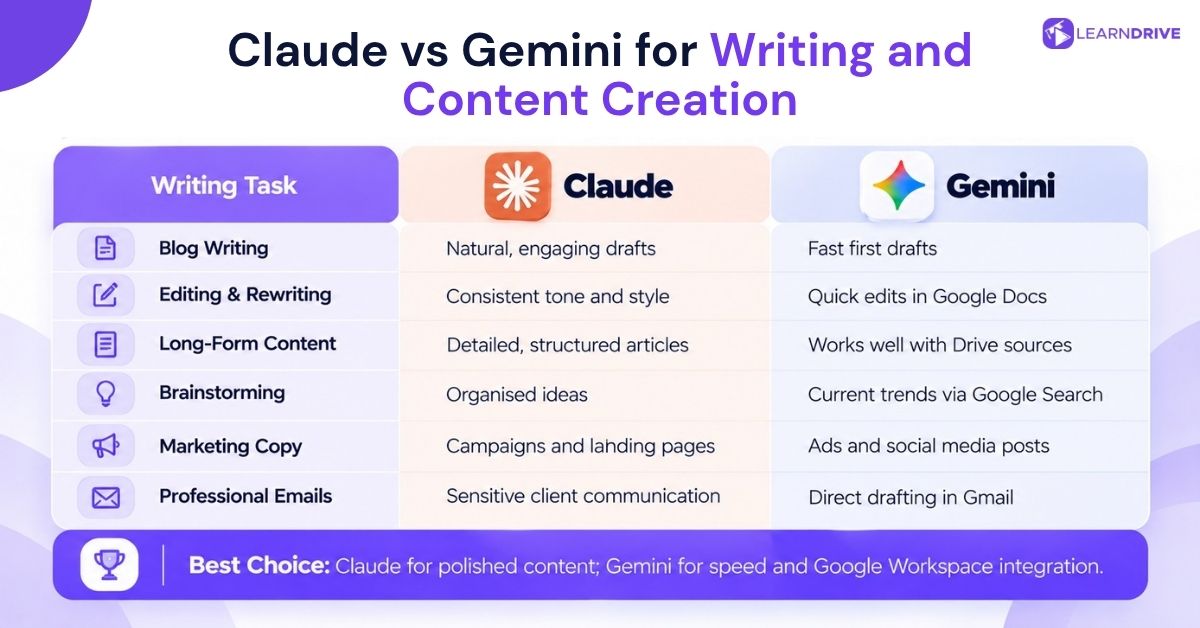
Writing quality is often the deciding factor for marketers, communicators, and teams sharing work with clients. The sections below compare how both tools perform across blog posts, rewrites, long articles, and daily team messages.
Blog Writing
Writing blog posts with Claude feels natural and varied, with very few repeating phrases across long drafts. Gemini produces solid first drafts quickly, though its longer articles can sometimes lean toward generic phrasing.
Editing and Rewriting
Editing and rewrites favor Claude because it remembers tone through several rounds of edits. Gemini handles quick cleanups well, especially inside Google Docs where suggested changes appear right on your screen.
Long-Form Content
Writing long guides or in-depth reports suits Claude, which keeps a steady structure across thousands of words. Gemini can also write long pieces, but it works best when the background material already lives in Google Drive.
Brainstorming and Content Ideas
Brainstorming works well in both apps, but Gemini uses live Google Search to pull in fresh market trends. Claude tends to group new ideas into tidy lists with clear themes that are easy for teams to review.
Marketing Copy
Quick social media posts and ad copy benefit from Gemini’s live link to current online trends. Claude remains stronger for full marketing campaigns, landing pages, and email sequences that need a natural human voice.
Professional Emails and Communication
Drafting serious emails suits Claude’s calm, measured tone, which works well for sensitive client updates. Gemini handles everyday emails quickly, letting you draft and reply directly inside Gmail without leaving your inbox.
Which Is Better for Writing?
Choose Claude if you want polished drafts that need almost no editing before you hit send. Choose Gemini if you care more about speed and drafting directly inside Google Docs without copy-pasting.
Claude vs Gemini for Research
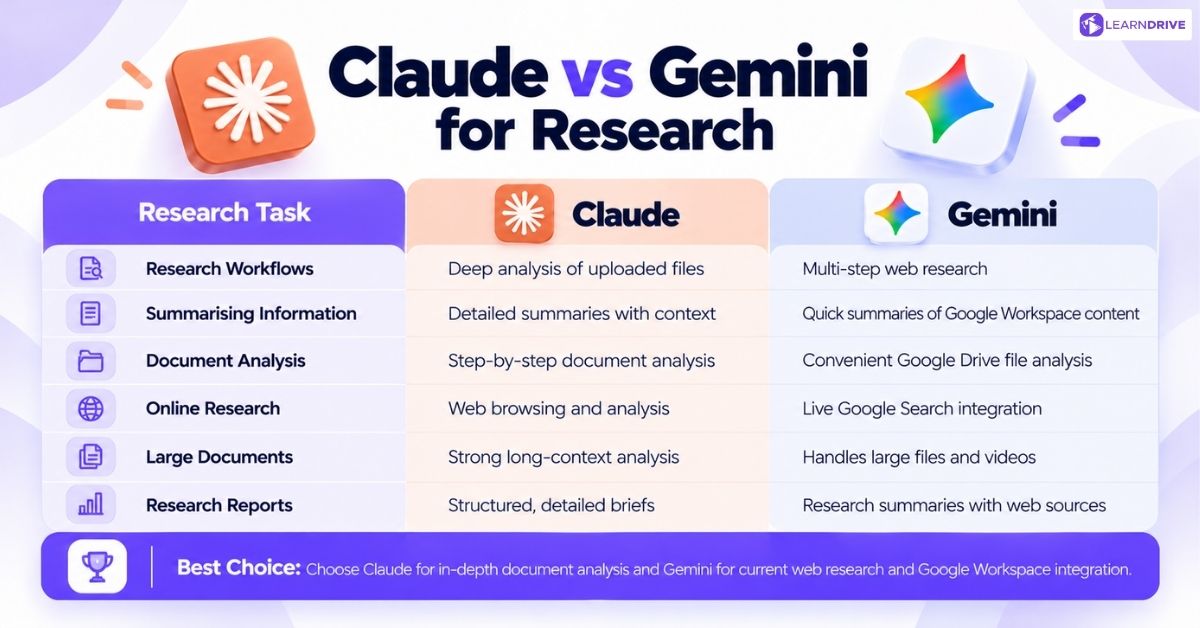
Good research needs accurate facts, clear summaries, and organized notes from large piles of information. This section compares how both tools read uploaded documents, search the web, and build structured research briefs.
Research Workflows
Research steps differ between the two apps. Claude is best when you upload big files directly and ask layered questions. Gemini uses Deep Research to run multi-step web searches on the live internet on its own.
Summarising Information
Summarizing dense reports favors Claude, which keeps key details and subtle points across long chapters. Gemini summarizes Gmail threads and Google Docs faster, thanks to its direct access to your personal drive.
Analysing Documents
Reading through contracts and financial papers highlights Claude’s skill at step-by-step logic and careful breakdowns. Gemini also reviews files well, especially when those documents already sit in your Google Drive folders.
Finding Information Online
Finding current facts online clearly favors Gemini, thanks to its built-in link to live Google Search. Claude can also browse the web, but Gemini’s search results feel smoother and much more up to date.
Handling Large Amounts of Content
Reviewing huge texts fits Claude’s large memory window, making it great for reading entire books or legal files. Gemini also handles massive files on paid plans, reading through long documents and videos without slowing down.
Producing Structured Research
Building neatly formatted research briefs with clear headings and summaries fits Claude’s naturally tidy writing style.
Which AI Is Better for Research?
Choose Claude if your research involves reading uploaded papers and digging deep into specific files. Choose Gemini if you need fresh web facts, live news, and broad searches across current topics.
Claude vs Gemini for Coding
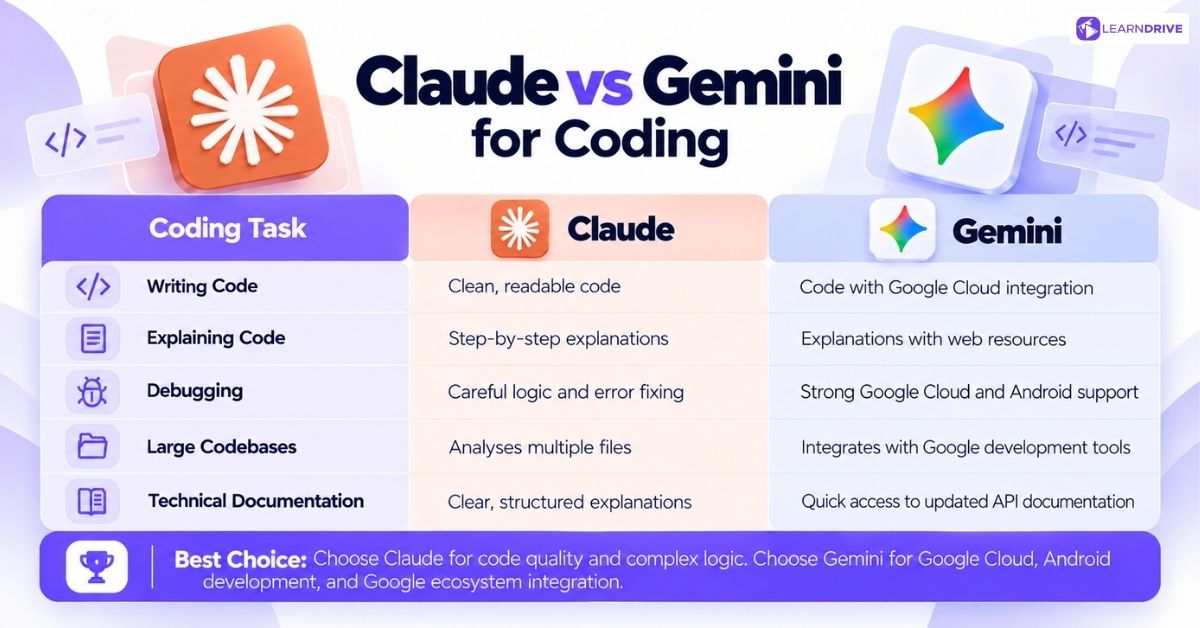
Coders judge AI tools on code accuracy, clear explanations, bug finding, and project scale. This section checks how both tools write code, explain logic, fix errors, and read tech guides.
Writing Code
Writing code with Claude usually gives cleaner, easier-to-read scripts, especially when tackling tricky logic problems. Gemini writes working code as well and links smoothly with Google Cloud developer tools.
Explaining Code
Explaining complex code is a strong point for Claude, which walks through logic step by step for new learners. Gemini also explains code well and uses search to find external docs and forum answers.
Debugging and Troubleshooting
Fixing broken code slightly favors Claude, as it follows the code flow carefully before offering a fix. Gemini troubleshoots well too, especially when working inside Google Cloud or building native Android apps.
Working Across Large Codebases
Reviewing large coding projects benefits from Claude’s big memory window, letting teams check multiple files at once. Gemini handles big codebases well too and links easily with Google Cloud services. Engineers frequently complement both tools with dedicated programming tutorials when exploring unfamiliar code libraries or fixing older software tools.
Understanding Technical Documentation
Reading tech guides is a shared strength, but Claude’s clean formatting is often simpler to scan. Gemini finds updated API notes quickly, letting developers read fresh rules right alongside their code.
Which Is Better for Coding?
Choose Claude if you want clean code, careful logic, and clear step-by-step reasoning for custom software projects. Choose Gemini if your team already works inside Google Cloud, Android Studio, or big Google systems. Aspiring engineers evaluating these tools often explore what jobs you can get with a computer science degree to plan their future careers.
Claude vs Gemini for Productivity
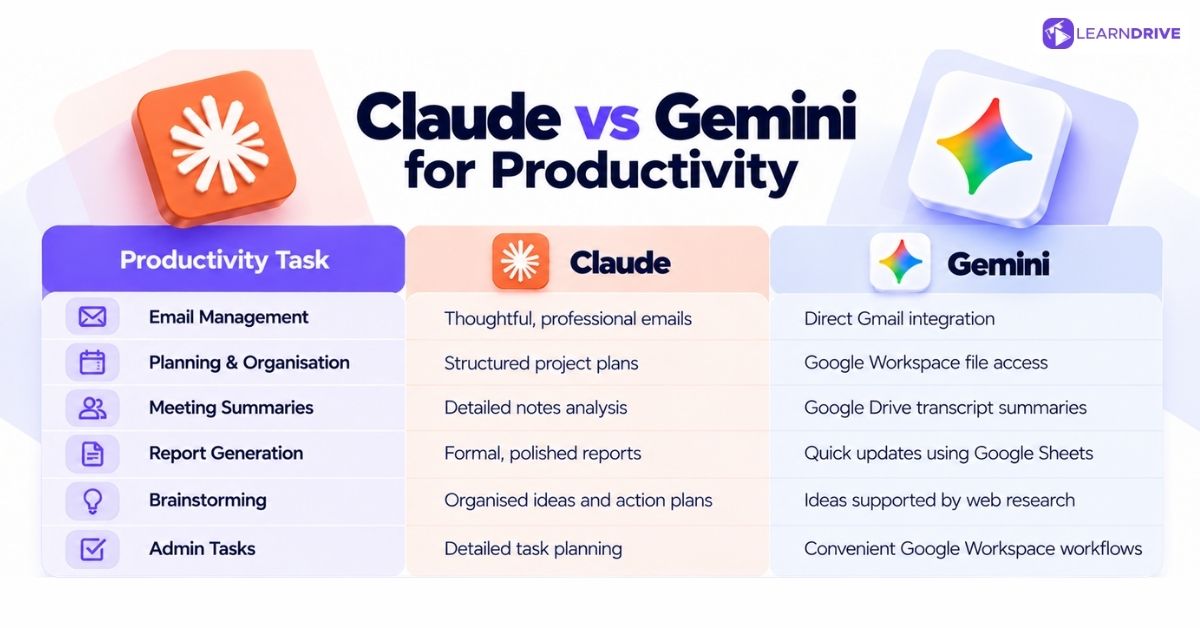 Daily office work is rarely about writing essays or building software from the ground up. This section covers emails, schedules, meeting recaps, team reports, brainstorming, and routine office chores.
Email Management
Handling daily emails is much easier with Gemini, which lets you write and send notes inside Gmail without opening new tabs. Claude writes thoughtful emails as well, but you must copy them over from another window.
Planning and Organization
Building project timelines works smoothly on both tools, depending on where your project files live. Teams on Google Workspace benefit from Gemini’s file access, while Claude excels at building clean step-by-step project plans.
Summarizing Meetings
Summarizing team meetings favors Gemini when transcripts and audio files are already saved in Google Drive. Claude also does great work here, especially when reading through complex meeting notes.
Report Generation
Writing formal business reports fits Claude’s neat, professional style when creating deliverables for clients. Gemini builds internal team updates quickly, especially when pulling live data directly from Google Sheets.
Brainstorming and Ideation
Brainstorming runs well on both apps, with Gemini adding real-time web facts to creative sessions. Claude organizes random ideas into tidy action plans that help teams choose their next steps.
Repetitive Administrative Tasks
Automating boring admin tasks works best when you use whichever assistant sits closest to your daily software tools.
Which AI Is Better for Everyday Work?
If your workday revolves around Gmail, Docs, and Drive, Gemini saves real time by cutting down on tab switching. If your daily work depends on deep writing and careful file reviews, Claude’s quality is well worth the extra step.
Claude vs Gemini for Google Workspace and Other Integrations
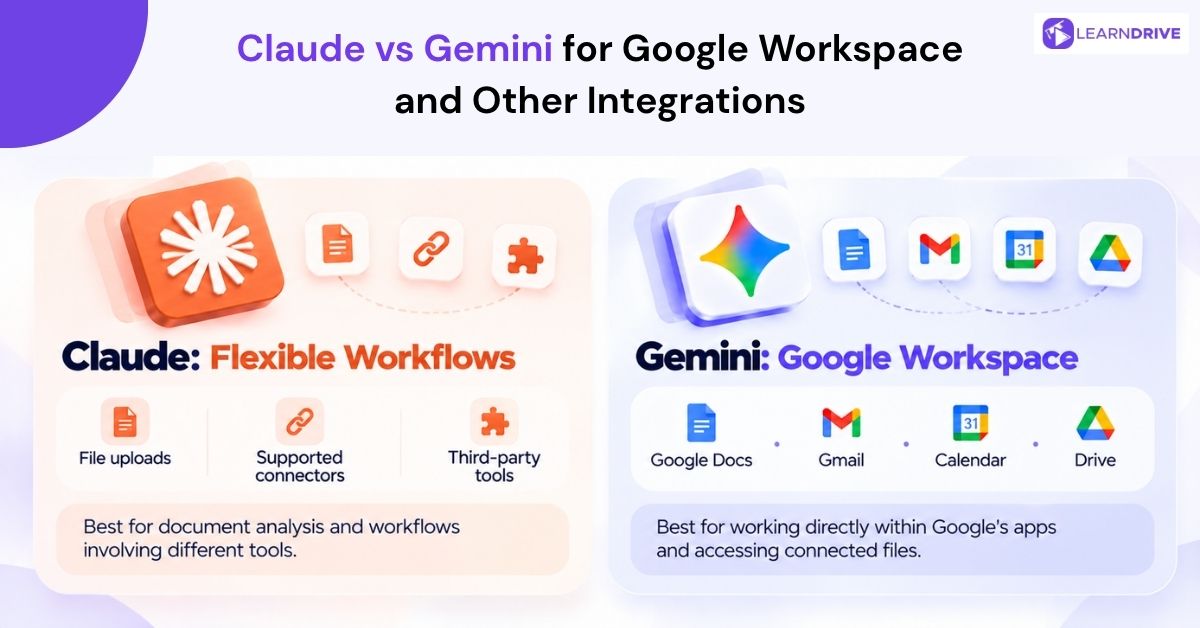
How well an AI links with your current software often matters more than small differences in test scores. This section checks connections across Google Docs, Gmail, Google Calendar, Drive, and outside work tools.
Document editing strongly favors Gemini because it lives inside Google Docs to help with drafting and inline edits. Claude reads files through uploads and outside connectors rather than sitting inside the document editor.
Email and calendar tasks also favor Gemini through its native setup inside Gmail and Google Calendar. Claude requires extra setup or third-party add-ons to touch your email inbox or update your schedule.
Storage access favors Gemini for the same reason, as files in Google Drive are always ready to read. Claude inspects uploaded files with great care, making it great for one-off reviews of single documents.
Outside tools like Slack, Notion, and Excel link directly to Claude through simple team connections. Gemini keeps its focus mostly inside the Google family, offering fewer direct links to outside apps.
For teams fully committed to Google Workspace, Gemini’s built-in tools offer speed that is hard to beat. For teams using a mix of different software, Claude’s simple app links often bring much more value.
Claude vs Gemini for Different Types of Professionals
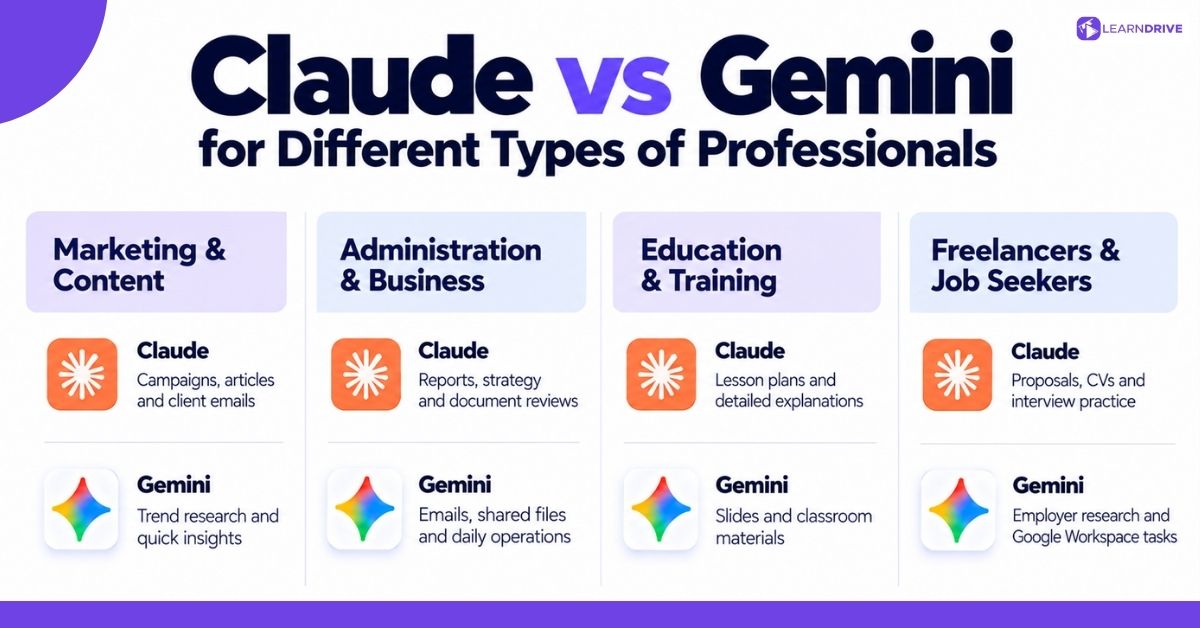
Different jobs need different strengths from an AI assistant. The points below review practical advice for marketers, office admins, teachers, freelancers, business owners, and job seekers.
For Marketers
Gemini is great for quick research and spotting new trends through live Google Search. Claude is the better choice for writing full campaigns, long articles, and customer emails that need real warmth.
For Administrators
Gemini’s native link to Gmail and Docs speeds up daily office chores without switching screens. Claude helps admins who juggle files from outside vendors, offering thorough checks of dense paperwork.
For Educators and Trainers
Claude’s clear explanations help teachers build detailed lesson plans and explain hard topics to students. Gemini helps build classroom slides and handouts directly inside Google Docs and Slides. Educators also actively evaluate the wider pros and cons of AI for students when setting school rules around homework assistance.
For Freelancers
Claude helps freelancers write sharp project proposals, client reports, and professional updates. Gemini helps solo workers who already run their client work through Gmail and Google Drive. Independent creators also explore flexible digital opportunities, including practical ideas on how to make money without a job through AI-assisted services.
For Business Owners
Claude offers great help for writing business strategy, drafting contracts, and creating team guides. Gemini helps manage daily operations across an entire company, from emails to shared team sheets. Leaders exploring automation increasingly study implementing generative AI in business to speed up daily office work without disrupting core operations.
For Job Seekers
Claude helps job hunters write custom resumes, personal cover letters, and practice interview answers. Gemini helps research new employers and leadership teams by pulling fresh details from live search. Candidates pair these research capabilities with market reports outlining the skills employers will need in the future to target high-growth opportunities. Job applicants also use AI assistants to draft careful job notes, such as learning how to decline a job offer politely without burning bridges.
Claude vs Gemini: Strengths and Limitations
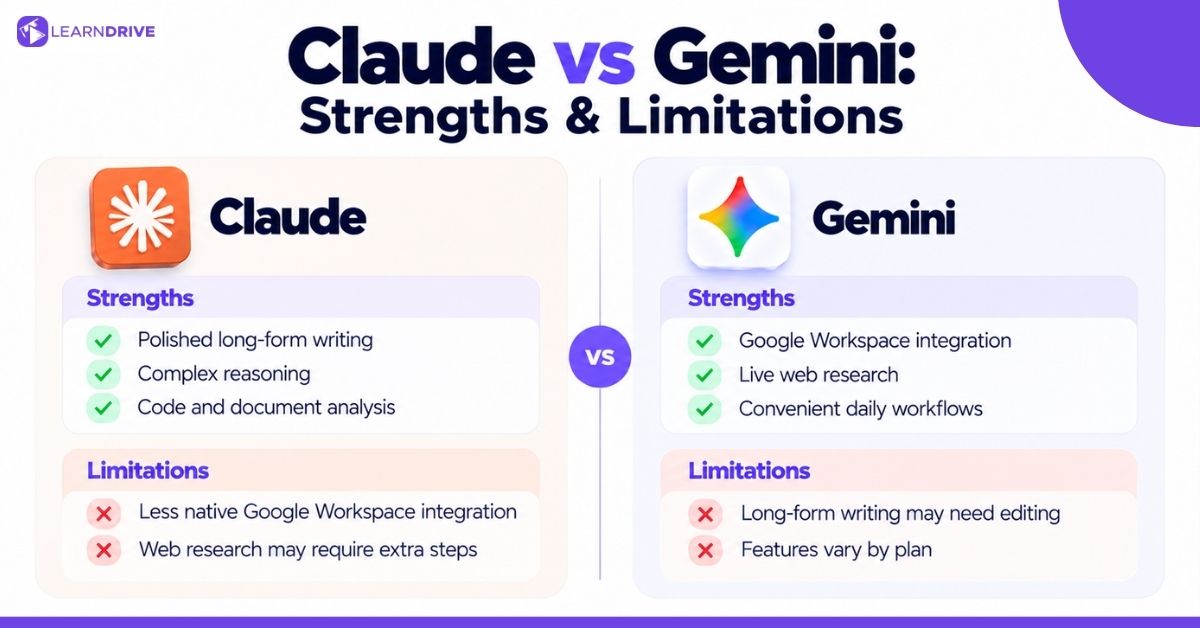
Every AI tool comes with real trade-offs, and naming them clearly helps you make a better choice.
Claude’s Main Strengths
Claude produces neat, well-organized writing across long documents without repeating itself. Its reasoning feels careful and steady, making it very dependable for complex, multi-step tasks.
Claude’s Limitations
Claude lacks the direct links to Gmail, Google Docs, and Calendar that make Gemini so handy. Its live web search has improved over time, but it still trails Google’s massive search index.
Gemini’s Main Strengths
Gemini’s built-in presence inside Gmail, Docs, Sheets, and Calendar saves time on daily tasks. Its connection to live Google Search gives it a real edge for finding breaking news and fresh facts.
Gemini’s Limitations
Gemini’s writing can feel a bit plain or repetitive across long multi-page projects. Some users have also noted changes in feature access across different paid tiers over the past year.
Claude vs Gemini: Which One Should You Choose?
The best choice depends on what your daily workday actually asks you to finish.
Choose Claude if you mainly need clean long-form writing, careful review of uploaded files, and tidy code for custom projects.
Choose Gemini if you mainly need direct tools inside Gmail and Docs, quick web search, and a smooth fit with Google apps.
Consider using both if your job mixes heavy writing with daily Google tasks, or if you want to check answers from both models.
Can You Use Claude and Gemini Together?
Many workers use both tools side by side rather than locking themselves into one app. Using each tool for its best skill often beats forcing one assistant to do every single job.
A common setup starts with Gemini for quick web research and gathering notes from Google Drive. Workers then copy that material into Claude to write and polish the final report.
Other combinations work well too, depending on your job. A marketer might use Gemini to check daily trends, then use Claude to write the final campaign copy.