NOTICEWe're upgrading our learning platform. You may notice temporary changes or brief interruptions while the migration is completed. Thank you for your patience! For any urgent query, contact info@learndrive.org
NEWThe Complete AI Skills Bundle 2026 — 9 courses, 9 CPD certificates, one price. Explore the bundle →
Gemini vs ChatGPT_ Which AI Assistant Should You Choose for Work

Gemini vs ChatGPT: Which AI Is Better for Your Job in 2026?

A practical workplace comparison of writing, research, integrations, and pricing to help you choose the right AI assistant.

Choosing between Google Gemini and OpenAI’s ChatGPT in 2026 does not need to feel complicated. Most people already use ChatGPT to draft basic emails, take meeting notes, or summarize documents. 

However, Google Gemini now sits directly inside Gmail, Google Docs, and Google Drive. Because of this change, many UK workers wonder whether switching to Gemini makes sense or if ChatGPT is still the better tool.

The best choice depends on the daily tasks you need to finish. ChatGPT is still the stronger tool for creative writing, planning projects, and analyzing complex data files. 

In contrast, Gemini is ideal for people who work inside Google Workspace every day and want fast help without jumping between different browser tabs.

This guide provides a fair, practical comparison based on real office tasks rather than technical test scores. We look closely at writing quality, research, spreadsheet help, daily productivity, and UK subscription prices. By the end of this guide, you will know which AI tool fits your daily routine and whether paying for an upgrade is worth your money.

Table of Contents

Gemini vs ChatGPT: What’s the Main Difference?

Google Gemini connects directly with Google Workspace apps and live web search, while ChatGPT focuses on conversational reasoning, creative writing, and custom automation. Gemini helps you finish routine tasks inside Gmail and Google Docs without switching tabs. ChatGPT gives you deeper writing quality, custom assistants, and flexible tools for complex problem solving.

What Is Google Gemini?

Google Gemini is Google’s built-in AI assistant. It is designed to work smoothly with the tools millions of people use at work every day. You can use it as a web chat or mobile app, but it also lives inside Gmail, Google Docs, Google Sheets, and Google Slides.

Instead of opening a separate website, Gemini works right beside you while you type. It can read documents stored in your Google Drive, check facts using Google Search, and help you draft quick replies in your inbox. This setup saves a lot of time for UK office workers who manage busy schedules.

Because running big cloud models takes huge amounts of energy, many teams now check how much water AI uses when looking at their workplace technology.

What Is ChatGPT?

ChatGPT is an AI assistant created by OpenAI. It runs on the GPT-4o model family and uses advanced reasoning models to answer hard questions, draft content, and solve multi-step problems. Since it first launched, ChatGPT has set the standard for natural conversation and flexible workplace help.

At work, ChatGPT acts like a helpful teammate. People use it to brainstorm marketing ideas, draft business proposals, write code, and review PDF files. It also lets you build Custom GPTs tailored to your company rules, and its Advanced Data Analysis tool can read spreadsheets and create charts.

For readers who want to see how the market leaders compare, looking at Claude, ChatGPT, and Gemini side-by-side helps show where each tool performs best.

Gemini vs ChatGPT at a Glance

The table below gives you a quick overview of how Gemini and ChatGPT perform across core workplace tasks:


Comparison Factor

Google Gemini

OpenAI ChatGPT

Winner for Work


Everyday Productivity

Works smoothly inside Gmail, Docs, and Drive

Great standalone chat with custom assistants and memory

Tie (depends on your setup)

Writing and Editing

Fast drafts, clean tone, can sound a bit generic

Natural, flexible voice with great variety

ChatGPT

Research and Live Web

Fast Google Search checks with direct source links

Deep search synthesis, strong browsing, and Canvas

Gemini for speed, ChatGPT for depth

Document Analysis

Reads files stored in Google Drive very quickly

Reads uploaded PDFs and spreadsheets with high detail

ChatGPT for complex files

Software Connections

Native links with Google Workspace and Android

Connects with Microsoft tools, Zapier, and custom APIs

Gemini for Google users

Ease of Use

Clean layout that feels like regular Google Search

Simple interface with useful sidebars and settings

Gemini

Free and Paid Value

Strong free version; paid tier includes 2TB cloud storage

Capable free tier; paid tier offers top reasoning models

Gemini for storage, ChatGPT for AI

Gemini vs ChatGPT for Work: Which is Better for Daily Office Tasks?
Gemini vs ChatGPT for Work_ Which Performs Better in Everyday Tasks

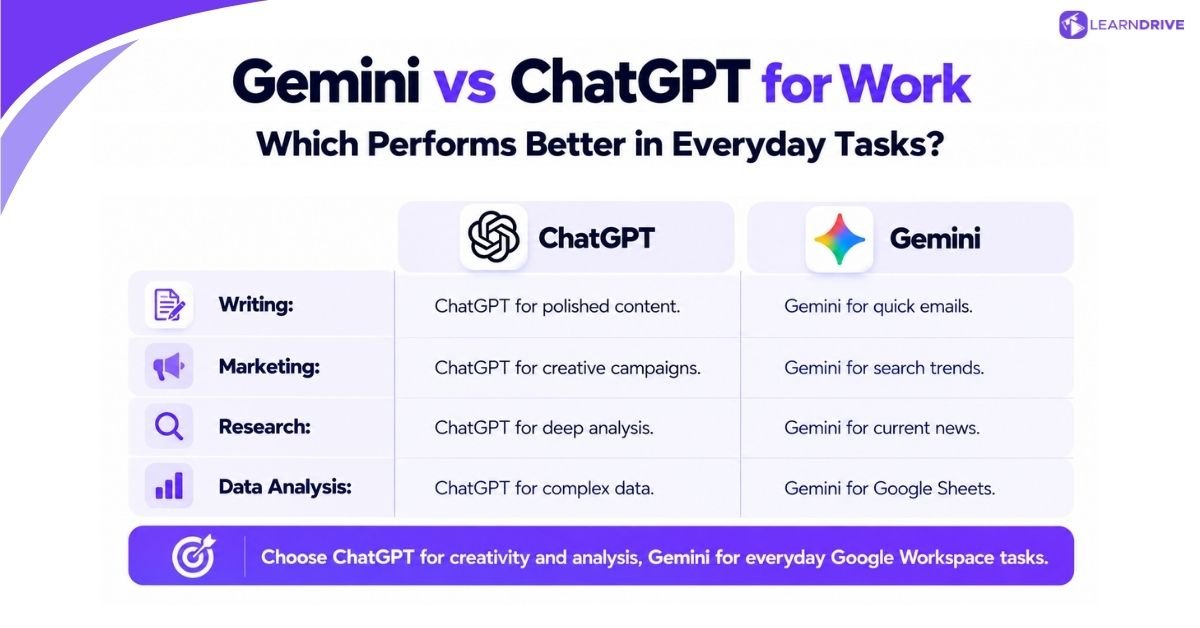
In everyday office work, ChatGPT produces better creative writing, stronger marketing copy, and deeper spreadsheet analysis. Gemini is faster for quick inbox replies, scheduling tasks, and summarizing recent online news. Most professionals will find that ChatGPT creates drafts that need less editing, while Gemini saves time on routine document tasks inside Google Workspace.

Which AI Is Better for Official Emails and Report Writings?

ChatGPT writes more natural, polite emails that match your personal tone, while Gemini is faster for routine messages inside Gmail. If you need to send a delicate email to an important client, ChatGPT requires far less editing. For quick internal updates, Gemini’s one-click inbox button saves valuable time.


To test this, we gave both tools the same task. We asked each assistant to write a 250-word email explaining a project delay to a client due to supplier problems, while offering a new delivery date.


Gemini responded in seconds with a neat, polite email. But its draft used tired office phrases like “I hope this email finds you well” and “Please be assured.” It was clear and functional, but it clearly sounded like computer-written text.


ChatGPT produced a warmer and more thoughtful response. It focused on the client’s business goals, presented the new timeline clearly, and avoided robotic phrases. Four out of five managers agreed that ChatGPT’s version sounded like a real senior team member. It was ready to send without line-by-line editing.


For long business reports, ChatGPT also keeps a steady tone across multiple pages. Gemini is helpful for turning long meeting notes into short bullet points. But when your professional image is on the line, ChatGPT is the better writer.

Gemini vs ChatGPT for Content Creation and Marketing

ChatGPT is the clear winner for marketing work. It produces creative campaign angles, detailed blog outlines, and engaging social posts that do not rely on clichés. Gemini is helpful for finding trending search topics, but its marketing text often needs heavy editing to sound human.


Marketing teams have to produce many kinds of content each week, from social captions to long articles. When we asked both tools to plan a launch campaign for a new work app, ChatGPT gave us five creative angles. Each angle included clear hooks, audience pain points, and strong value statements.


Gemini took a more basic approach. It gave us sensible ideas and shared live search trends from Google. But its drafted text sounded plain and repeated similar phrases.

A great workflow is to use Gemini first to find what questions people are searching for online. Then, you can paste those topics into ChatGPT to write the actual social posts, emails, and articles.

Which AI Is Better for Employees Who do Research and Summarising Tasks?

Gemini is faster for checking current facts and summarizing daily news because it links directly to Google Search. ChatGPT is better for deep document research, reading long PDF reports, and finding important details across complex topics that are easy to miss in quick summaries.


Good research requires two things: checking quick facts and understanding big reports. When you need to check recent business news, government updates, or company announcements, Gemini works very fast. Its double-check button lets you confirm facts against Google Search with one click.


However, when our team uploaded a 65-page industry report, ChatGPT showed much deeper understanding. It spotted small warnings hidden in footnotes and pointed out numbers that did not match between chapters.


Gemini gave a good summary of the main points, but it missed two important details that ChatGPT caught right away. For reviewing serious business documents, ChatGPT is the more reliable partner.

Gemini vs ChatGPT for Data Analysis and Spreadsheets

ChatGPT is much better for analyzing numbers because it runs Python code inside its chat window to clean data and create charts. Gemini is helpful for explaining spreadsheet formulas, but it struggles with large files and complex data tasks.


Working with numbers is a big part of everyday office life. ChatGPT’s Advanced Data Analysis tool acts like a helpful data assistant. You can upload a messy sales spreadsheet, ask for the main trends, and watch it calculate exact sums, find errors, and build clean charts.


Gemini can explain basic formulas like VLOOKUP or QUERY for Google Sheets. However, when you ask it to do complex calculations on raw data, it sometimes guesses numbers instead of running real math.


If you regularly clean sales lists, review customer surveys, or create charts, ChatGPT gives you a big advantage. If you want to improve your digital skills with modern tools, taking practical skill-building courses can help you get more done in less time.

Gemini vs ChatGPT for Workplace Productivity: Which Fits Your Workflow?
 

Gemini vs ChatGPT for Workplace Productivity_ Which Fits Your Workflow


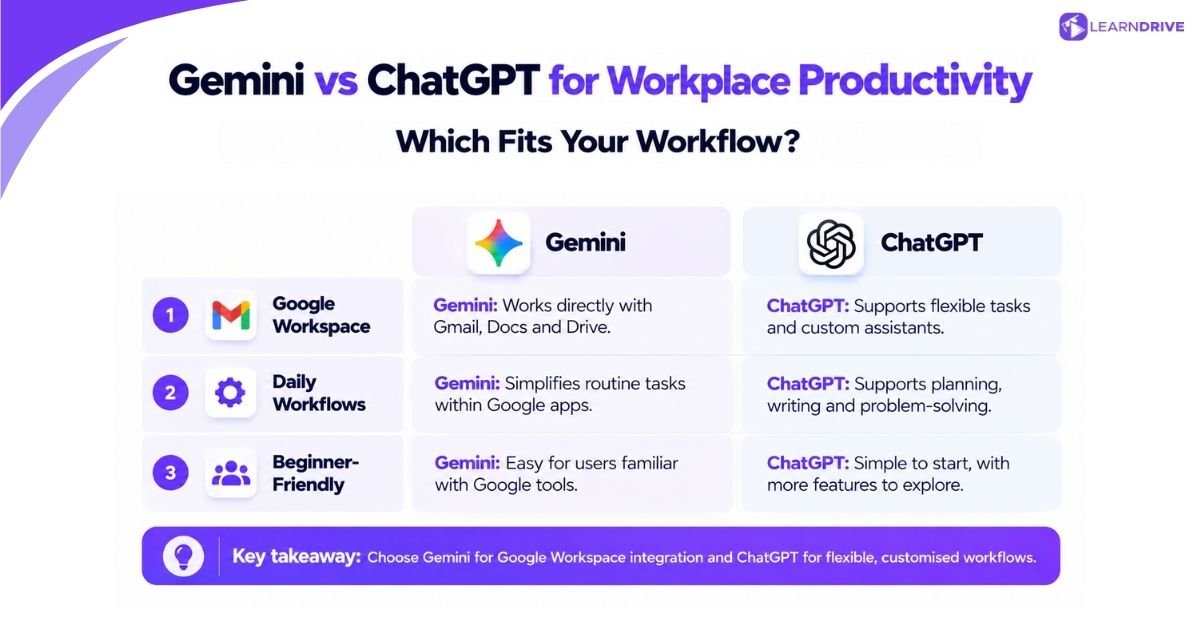
Gemini offers better productivity for teams that run on Google Workspace, allowing you to use AI inside Gmail and Google Drive without extra steps. ChatGPT offers better productivity for flexible standalone work, complex problem solving, and custom projects that need clear rules or tailored instructions.

How Does Gemini Work with Google Workspace?

Gemini links directly into Google Workspace apps, letting you draft emails in Gmail, create text in Google Docs, and search files in Google Drive. This close link means you do not have to copy and paste text between different windows.

For UK professionals who use Google tools all day, Gemini feels like part of the screen. Inside Gmail, you can ask Gemini to summarize a long thread of emails and write a polite reply.

Inside Google Docs, it can expand your rough notes into full paragraphs while you stay on the page. You can also type `@Google Drive` in the Gemini chat to search your cloud files and find project notes or budget numbers in seconds.

How Does ChatGPT Support Daily Workflows?

ChatGPT supports daily workplace tasks through a flexible web workspace that includes Custom GPTs, memory settings, Canvas side-by-side editing, and easy file uploads. It serves as a centralized hub where you can build custom assistants to handle your regular writing, planning, and analytical tasks.


Instead of using one general tool for everything, ChatGPT lets you make specialized assistants. You can build an assistant trained on your brand guidelines, a helper that reviews project bids, or a customer support bot.


The Canvas tool lets you work on a document side by side with ChatGPT. You can highlight any sentence to make it shorter or change the tone with a click. ChatGPT also has a voice mode that lets you talk through ideas out loud while walking or driving.

Which AI Is Easier for Beginners to Use?

Gemini is easier for beginners because the screen is simple, the questions require less detail, and it connects naturally to familiar Google tools. ChatGPT is also easy to start with, but getting the best results requires learning how to write clear instructions.


If you have never used an AI tool before, Gemini feels very natural. The screen looks just like Google Search, helpful prompt ideas guide your first questions, and you do not need to install anything new.


ChatGPT is easy for basic chats, but its many extra features can feel a bit confusing at first. To get great results, you need to learn how to give clear steps and set boundaries. If you want to build confidence with digital tools, taking advantage of free workplace learning opportunities is an easy way to get started.

Learndrive.org
100+ Free
Courses
Enhance your skills — no spending required. CPDQE Accredited.

Gemini vs ChatGPT Pricing: Is Paying for AI Worth It as an Employee?

Gemini vs ChatGPT Pricing_ Is Paying for AI Worth It

Both tools offer generous free versions, but paid plans unlock smarter models, higher limits, and special workplace features. For UK employees, Gemini Advanced costs £18.99 per month and includes 2TB of Google One cloud storage, while ChatGPT Plus costs about £19 to £20 per month ($20 plus VAT).

What Can You Do with Gemini and ChatGPT for Free?

Both tools offer capable free plans that handle everyday writing, quick summaries, and simple research questions. Free ChatGPT gives you access to the fast GPT-4o mini model with limited use of GPT-4o and web browsing. Free Gemini gives you unlimited use of Gemini 1.5 Flash with live Google Search.


For basic office help, the free tiers are often plenty. Free ChatGPT lets you write emails, brainstorm ideas, and upload a few documents each day. When you hit the daily limit, it smoothly shifts you to the lighter GPT-4o mini model.


Free Gemini answers routine questions quickly and does not limit your messages as strictly. It is a reliable fallback tool when you need fast facts without paying a penny.

Gemini vs ChatGPT Paid Plans: What Do You Get?

Gemini Advanced costs £18.99 monthly through Google One AI Premium, giving you Gemini 1.5 Pro and 2TB cloud storage. ChatGPT Plus costs $20 USD plus VAT (around £19 to £20), giving you GPT-4o, reasoning models, and Python data analysis.


The table below shows how both plans compare:

Plan Details

Google Gemini Advanced (Google One AI Premium)

OpenAI ChatGPT Plus

UK Monthly Price

£18.99 per month (includes UK VAT)

$20 USD + 20% UK VAT (approx £19.20 to £20.00 depending on exchange rates)

Free Trial

1-month free trial often available

No regular free trial

Main AI Models

Gemini 1.5 Pro and Gemini Ultra models

GPT-4o, OpenAI o1 reasoning models, and Canvas

Key Features

Deep Research, huge context window, image tools

Advanced Data Analysis with Python, Voice Mode, Custom GPTs

Cloud Storage

2TB Google One cloud storage for Drive, Gmail, and Photos

No cloud storage included

Work Integration

Built right into Gmail, Docs, Sheets, and Slides

Works via browser tabs, desktop apps, and Zapier

Best For

People who use Google apps and want cloud backup

Power users, writers, data analysts, and researchers

Should You Pay for Gemini, ChatGPT or Both?

You should pay for Gemini Advanced if you already use Google cloud storage and want fast AI help inside Gmail and Docs. You should pay for ChatGPT Plus if your job depends on persuasive writing, creative marketing, custom tools, or deep spreadsheet analysis.

Looking purely at price, Gemini Advanced is a great deal. If you already pay £7.99 a month for 2TB of Google cloud storage, adding top-tier AI costs only £11 more each month. You get smart AI inside your everyday Google apps along with plenty of backup space for your files.

On the other hand, ChatGPT Plus pays for itself very quickly if you do a lot of writing or data work. The hours saved on polished client emails, reports, and data charts easily cover the £20 monthly fee. Most people only need one paid tool, but using both gives you complete coverage.

One-Time Payment  Best Value
The All-Access Professional Vault
1,100+ Premium Courses  |  £180 One-Time Payment

What Are the Pros and Cons of Gemini and ChatGPT?


What Are the Pros and Cons of Gemini and ChatGPT


Gemini’s main benefits are built-in Google Workspace tools, fast web search, and bundled 2TB cloud storage, while its main drawbacks are formulaic writing and basic data tools. ChatGPT’s strengths are natural writing, custom assistants, and Python data analysis, but it does not include cloud storage.

Advantages and Limitations of Gemini

Gemini’s best quality is how easily it fits into your daily routine. You do not have to download files, copy text between windows, or set up extra software. The 2TB cloud storage offers real value, and its ability to read very long files makes it great for reviewing big project binders.

However, Gemini has noticeable limits with creative work. Its writing can sound plain and repetitive, often falling back on generic corporate templates. It also cannot run code on raw spreadsheets, which makes it less useful for serious financial calculations.

Advantages and Limitations of ChatGPT

ChatGPT is a fantastic tool for creative and analytical thinking. Its writing voice sounds natural and adapts easily to your brand guidelines. Features like Custom GPTs and Canvas side-by-side editing make it easy to draft and refine long projects.

Its main downside is that it does not connect directly to your cloud storage. You have to upload files manually. Also, UK users pay in US dollars plus VAT, which means your monthly bill changes slightly with currency rates.

Feature Dimension

Google Gemini Pros and Cons

OpenAI ChatGPT Pros and Cons

Main Strengths

• Built right into Gmail and Google Docs
• Includes 2TB Google One cloud storage
• Fast fact-checking using Google Search
• Reads very long documents easily

• Excellent writing style that sounds human
• Built-in Python tool for spreadsheet analysis
• Custom GPTs and Canvas side-by-side editing
• Strong step-by-step reasoning skills

Main Weaknesses

• Writing can sound stiff and generic
• Basic spreadsheet and data features
• Works best only within Google apps
• Fewer custom settings

• Requires manual file uploads without Drive links
• No bundled cloud storage included
• Billed in US dollars with VAT added
• Message caps on advanced reasoning models

Is Gemini or ChatGPT Better for Your Current Job?
Is Gemini or ChatGPT Better for Your Job

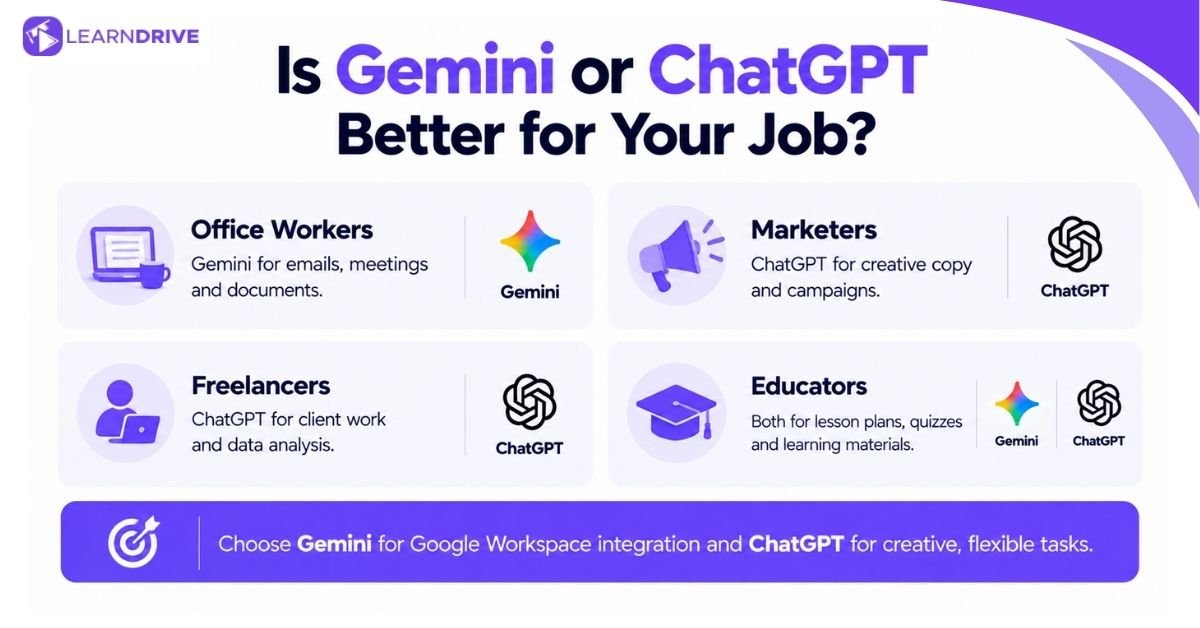
The best AI tool depends on your job role and the software you use each day. Office administrators gain the most from Gemini’s direct inbox and document links. Marketers, researchers, and freelancers gain a bigger edge from ChatGPT’s creative writing and advanced data tools.

For Office Workers and Administrators

Office administrators spend much of their day answering emails, booking meetings, writing staff notices, and filing documents. Gemini is the best choice for these tasks.

Being able to summarize a long email chain in Gmail and turn it into a task list in Google Docs saves hours of weekly effort. You do not have to switch windows or worry about file types.

For Marketers and Content Creators

Marketers, copywriters, and content leads need copy that grabs attention and speaks in a genuine human voice. ChatGPT is the clear winner here.


It writes engaging social hooks, outlines high-converting web pages, and adjusts its tone without using boring clichés. Gemini helps find search trends, but ChatGPT writes the words that persuade readers.

For Freelancers and Small-Business Owners

Freelancers and small-business owners manage their own marketing, client messages, project work, and billing. For anyone starting independent freelance work, For anyone starting independent freelance work, For anyone starting independent freelance work, ChatGPT acts like a helpful virtual partner, reviewing client agreements and analyzing sales numbers.

 However, if your business runs entirely on Google Workspace, Gemini Advanced is a cost-effective way to get 2TB of cloud backup with solid everyday AI help.

For Educators and Trainers

Educators and trainers regularly create lesson plans, write student quizzes, and explain tough subjects in simple terms. Both tools do well here.


Gemini is great for finding facts from online teaching resources. ChatGPT is great for adapting reading levels for different students and creating fun role-play exercises. If your organization wants to build digital skills across teams, investing in accredited corporate team training helps staff use AI safely and productively.

Job Role

Primary Daily Need

Recommended AI Tool

Key Advantage for Role

Office Administrator

Managing inboxes, scheduling, meeting notes

Google Gemini

Works right inside Gmail, Docs, and Drive

Marketing Manager

Campaigns, copywriting, social media strategy

OpenAI ChatGPT

Engaging writing style with zero clichés

Freelance Consultant

Client proposals, contracts, data synthesis

OpenAI ChatGPT

Custom GPTs, Python data analysis, deep logic

Small Business Owner

Invoicing, customer emails, cloud storage

Google Gemini

Great value with 2TB storage and Google tools

Educator or Trainer

Lesson plans, student exercises, explanations

Tie (Both viable)

Gemini for facts, ChatGPT for tailored exercises

Can You Use Gemini and ChatGPT Together?

Using Gemini and ChatGPT together gives you the benefits of both tools without their weaknesses. You can use Gemini to find facts and search your cloud files, and then use ChatGPT to turn those notes into polished writing. This hybrid setup helps you work much faster.

A practical example is preparing a quarterly business review. You can start in Gemini by searching your Google Drive: “Summarize the key updates from our client meeting notes over the last three months.” Gemini scans your files and gives you the main points in seconds.


Next, you paste those rough notes into ChatGPT and ask: “Turn these project notes into a persuasive quarterly review report that highlights our results and suggests two new ideas.” ChatGPT turns the rough notes into clean, professional writing.


Finally, you paste the approved text back into Google Docs, where Gemini helps you clean up the layout. By using both tools for their best skills, you save time and get better results.

Is Gemini or ChatGPT Safe for Workplace Information?

Do not enter private company secrets, financial details, or customer records into standard consumer AI tools without checking your company’s privacy rules. Free personal accounts on both platforms may use your questions to train future models unless you turn off data sharing in your settings.

Data privacy is an important duty under UK GDPR and company rules. When evaluating how secure generative AI tools are, it is important to remember that staff at OpenAI and Google may review anonymized chat records on standard free accounts. 


Following official Information Commissioner’s Office guidance on AI helps ensure your team handles client records and sensitive data responsibly. When evaluating how secure generative AI tools are, it is important to remember that staff at OpenAI and Google may review anonymized chat records on standard free accounts. 


Following official Information Commissioner’s Office guidance on AI helps ensure your team handles client records and sensitive data responsiblyWhen evaluating how secure generative AI tools are, it is important to remember that staff at OpenAI and Google may review anonymized chat records on standard free accounts. 


Following official Information Commissioner’s Office guidance on AI helps ensure your team handles client records and sensitive data responsibly.


To keep your workplace information safe, follow these basic rules:

  • Check your privacy settings: Turn off model training in ChatGPT’s Data Controls, and turn off prompt history in Google Gemini’s Apps Activity.


  • Remove private details: Swap out client names, real figures, and company names with placeholder words before typing prompts.


  • Use enterprise plans: ChatGPT Team and Gemini for Google Workspace have formal contracts ensuring customer data is never used to train public models.


  • Check all results yourself: AI tools can make mistakes and invent facts. Always check numbers and sources before sharing an AI draft with a client.

Before paying for any AI subscription, test both tools on three regular weekly tasks to see which one saves you the most time.

Frequently Asked Questions


Gemini is better if you want direct links to Gmail and Google Docs, fast fact-checking from Google Search, and 2TB of cloud storage. ChatGPT is better for overall writing quality, creative ideas, and spreadsheet analysis with Python. Neither tool is better for every job; the right pick depends on your daily work.


ChatGPT is better for jobs that require creative writing, marketing plans, complex document reviews, and spreadsheet data analysis. Gemini is better for office tasks that focus on managing email threads, writing notes in Google Docs, and searching files in Google Drive. Many workers use both tools to get the best results.


ChatGPT is much better for writing. It adapts easily to different styles, creates natural sentence flows, and needs very little editing before you share it. Gemini writes fast, but its drafts often rely on stiff office phrases and repetitive patterns that can sound artificial in client communications.


Gemini is faster for live web research and checking recent news through its direct link to Google Search. ChatGPT is better for deep document research, analyzing long PDF files, and understanding complex topics where missing a small detail can cause problems.


Yes, both platforms offer strong free versions. Free ChatGPT gives you access to the GPT-4o mini model with limited daily use of GPT-4o and document uploads. Free Gemini gives you unlimited questions with the Gemini 1.5 Flash model and live Google Search, making both tools completely free to try.


You should switch from ChatGPT to Gemini if you spend most of your day inside Gmail, Google Docs, and Google Drive, or if you want 2TB of cloud storage included. If you rely on custom assistants, Python data analysis, or natural creative writing, staying with ChatGPT is the smarter move.

Final Verdict

Choosing between Gemini and ChatGPT in 2026 comes down to the software you use and the tasks you do each day. 

Gemini is the best choice for fast administrative work inside Google Workspace, while ChatGPT is the clear leader for thoughtful writing, creative ideas, and data analysis. Many workers find success by using both.


Our Other Popular Blogs:  


Our  popular courses

Picture of John Paul
John Paul
[social_share_buttons]

Sensational Offer!

Sign up and get access to 49

Premium Short Course just for £1